
Will the madness never end? Komodia SSL certificates are EVERYWHERE

komodiaSo, as people have started turning over stones, looking to see how common these Komodia certificates are, some surprising (and depressing) things are beginning to surface.

  1. It does appear that Komodia is behind this.
  2. It appears that Komodia uses the same framework for many, many products. Here’s some that have been found so far:
    1. Komodia’s “Keep My Family Secure” parental control software.
    2. Qustodio’s parental control software
    3. Kurupira Webfilter
    4. Staffcop (version 5.6 and 5.8)
    5. Easy hide IP Classic
    6. Lavasoft Ad-aware Web Companion
    7. Hide-my-ip (note: this package does not appear to utilize the SSL MITM, and the certificate is slightly different from the one found in other packages however it still utilizes an unrestricted root certificate with a simple plaintext password.
  3. The password is always “Komodia”
  4. The certificates are always weak; the private key is always bundled with them (of course it is).

I think that at this point it is safe to assume that any SSL interception product sold by Komodia or based on the Komodia SDK is going to be using the same method.

What does this mean? Well, this means that those dodgy certificates aren’t limited to Lenovo laptops sold over a specific date range. It means that anyone who has come into contact with a Komodia product, or who has had some sort of Parental Control software installed on their computer should probably check to see if they are affected.

This problem is MUCH bigger than we thought it was.

SSL Ciphers –

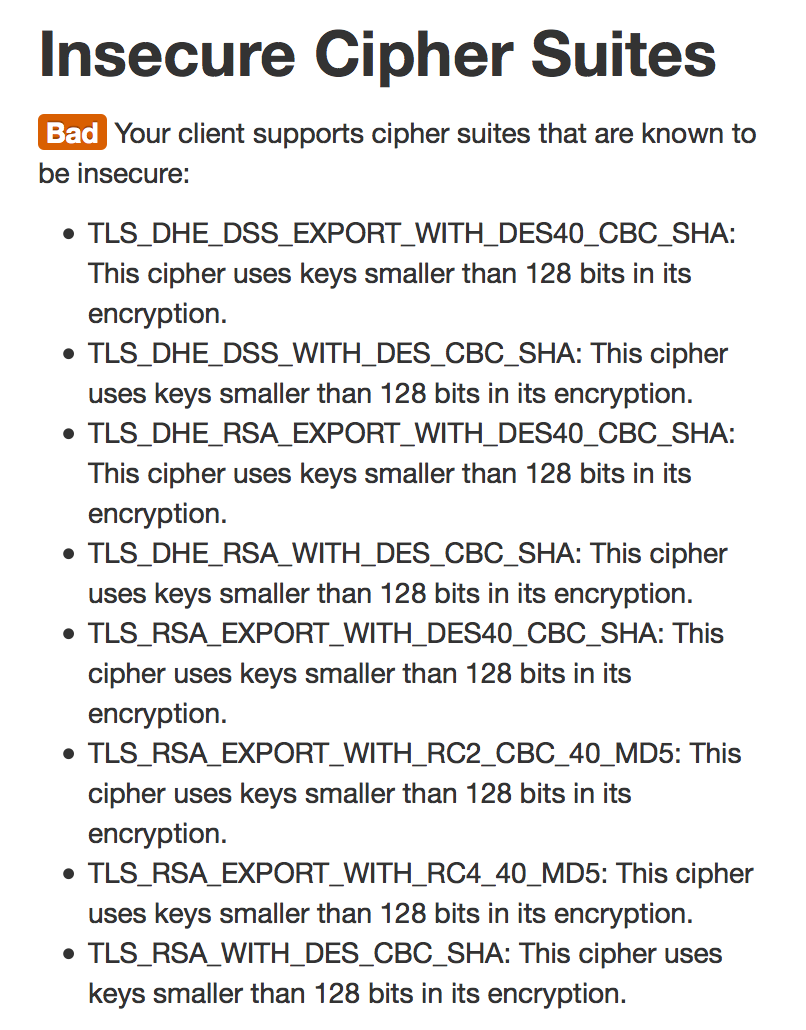
The next issue is that these “proxies” do not correctly implement SSL. They negotiate with the origin server on your behalf – so when you want to connect to your bank site it is this software that negotiates for you. However it does this badly. First of all it supports a range of ciphers including a number that had been deprecated years ago and others that simply should not be used – for example:
Screen Shot 2015-02-20 at 9.32.55 PM

This means the Komodia proxy software may potentially establish – or be forced into establishing – a weak SSL connection using breakable ciphers. This weak connection could then  be tampered with or eavesdropped on by hostile actors. the user will be completely unaware, and even if he inspects the status of his SSL connection all it would show is the strength of the connection between the browser and the Komodia software, not the connection going over the Internet.

In one move this software trashes the last decade of browser security and privacy work, and the last five years of SSL cipher management.

Certificate validation –

The next problem is that it does not appear to validate certificates properly. If a certificate fails validation, the proxy still lets it through and signs it with the Komodia certificate, but it changes the name on the certificate to “verify_fail.<whatever the original domain was>”  so for example if you browse to the self signed certificate on events.ccc.de you will see a Superfish signed certificate for verify_fail.events.ccc.de. its a cheeky attempt to cause a browser warning by having the name mismatch.

However as discovered by many, if you put the correct name into the “Alternate Names” field of the certificate the software will blindly copy that name across and when it changes the primary name, the Alternate Name field will still match the expected domain and the browser will believe the certificate to be valid. Epic Fail.

More details here: https://blog.filippo.io/komodia-superfish-ssl-validation-is-broken/

If you are a parent that has installed parental control software – in particular the ones named above – I would check to see if your computer has been affected by this, as a matter of urgency –

https://filippo.io/Badfish/

UPDATE: @filosottile has updated his test to check for the new certificates.

If you have come into contact with any Komodia product, I would check for unrestricted private root certificates, before carefully removing them and the associated software from any system that you care about.

Thanks to @thewack0lian for pointing this out! – https://gist.github.com/Wack0/17c56b77a90073be81d3

Thanks also to US CERT for additional vulnerable packages – http://www.kb.cert.org/vuls/id/529496

Lenovo installs adware on customer laptops and compromises ALL SSL.

boa2

A pretty shocking thing came to light this evening – Lenovo is installing adware that uses a “man-in-the-middle” attack to break secure connections on affected laptops in order to access sensitive data and inject advertising. As if that wasn’t bad enough, they installed a weak certificate into the system in a way that means affected users cannot trust any secure connections they make – TO ANY SITE.

We trust our hardware manufacturers to build products that are secure. In this current climate of rising cybercrime, if you can’t trust your hardware manufacturer, you are in a very difficult position. That manufacturer has a huge role to play in keeping you safe – from releasing patches to update software when vulnerabilities are found to behaving in a responsible manner with the data the collect and the privileged access they have to your hardware.

When bad guys are able to get into the supply chain and install malware, it is devastating. Often users find themselves with equipment that is compromised and are unable to do anything about it. When malware is installed with the access a manufacturer has, it buries itself deep inside the system – often with a level of access that takes it beyond the reach of antivirus or other countermeasures. This is why it is all the more disappointing – and shocking – to find a manufacturer doing this to its customers voluntarily.

Lenovo has partnered with a company called Superfish to install advertising software on it’s customer’s laptops. Under normal circumstances, this would not be cause for concern. However, Superfish’s software has quite a reputation. It is a notorious piece of “adware”, malicious advertising software. A quick search on Google reveals numerous links for pages containing everything from software to remove Superfish to consumers complaining about the presence of this malicious advertising tool.

Superfish Features:

  • Hijacks legitimate connections.
  • Monitors user activity.
  • Collects personal information and uploads it to it’s servers
  • Injects advertising in legitimate pages.
  • Displays popups with advertising software
  • Uses man-in-the-middle attack techniques to crack open secure connections.
  • Presents users with its own fake certificate instead of the legitimate site’s certificate.

This presents a security nightmare for affected consumers.

  1. Superfish replaces legitimate site certificates with its own in order to compromise the connections so it can inject its adverts. This means that anyone affected by this adware cannot trust any secure connections they make.
  2. Users will not be notified if the legitimate site’s certificate has been tampered with, has expired or is bogus. In fact, they now have to rely on Superfish to perform that check for them. Which it does not appear to do.
  3. Because Superfish uses the same certificate for every site it would be easy for another hostile actor to leverage this and further compromise the user’s connections.
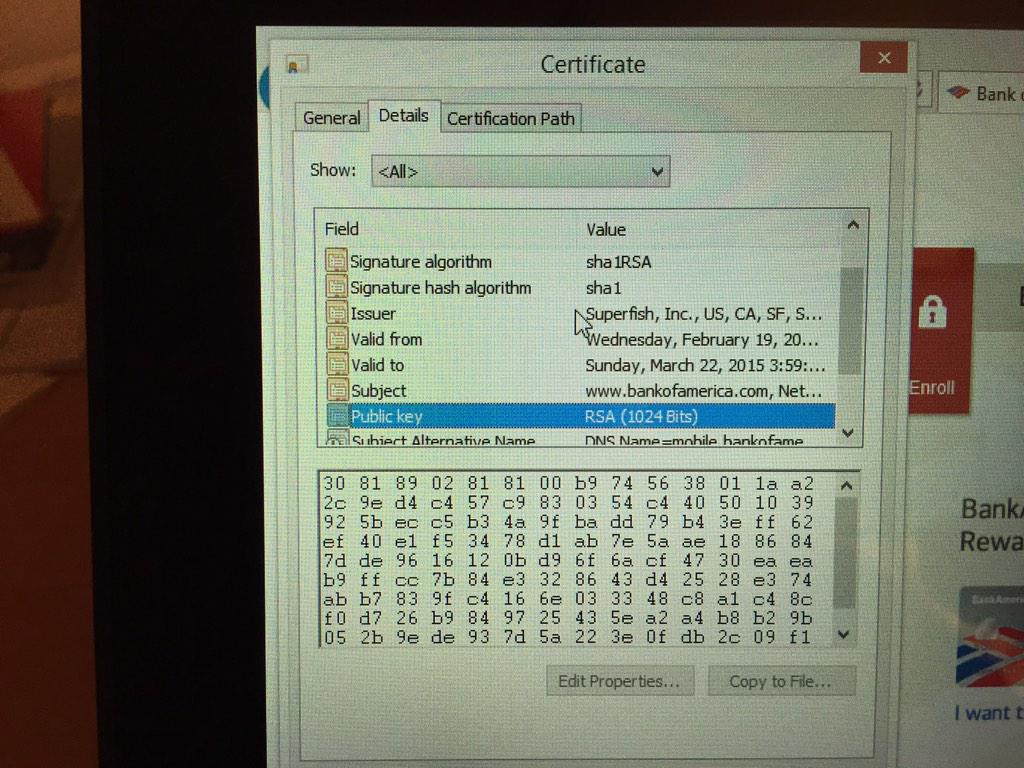
  4. Superfish uses a deprecated SHA1 certificate. SHA1 has been replaced by SHA-256 because attacks against SHA1 are now feasible with ordinary computing hardware. This is insult on top of injury. Not only are they compromising people’s SSL connections but they are doing it in the most cavalier, insecure way possible.
  5. Even worse, they use crackable 1024-bit RSA!
  6. The user has to trust that this software which has compromised their secure connections is not tampering with the content, or stealing sensitive data such as usernames and passwords.
  7. If this software or any of its control infrastructure is compromised, an attacker would have complete and unrestricted access to affected customers banking sites, personal data and private messages.

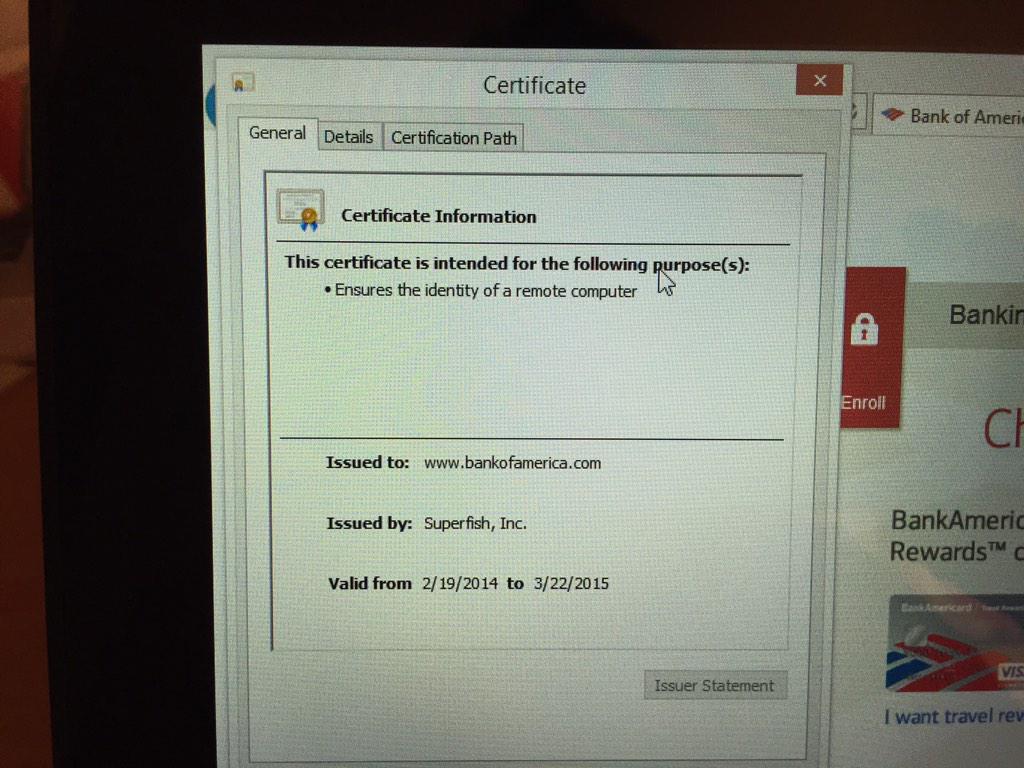
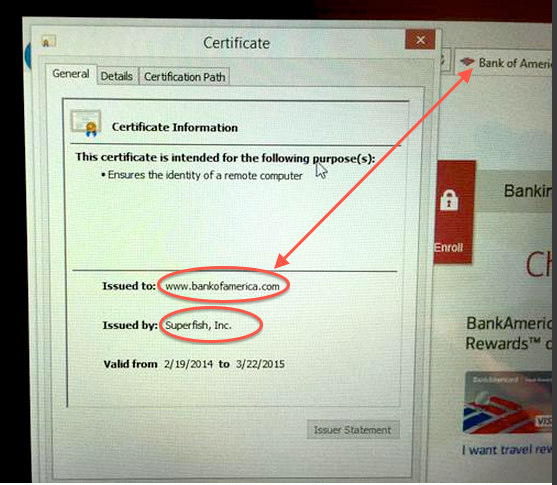
Below is a photo showing Superfish on an affected laptop presenting a fake certificate instead of the legitimate “Bank of America” certificate. As you can see the user is presented with the fake Superfish certificate instead of the legitimate BoA certificate.

BOA-Large certificate

The only way a user would know this has happened is if they check the certificate’s details. Something most ordinary users are unlikely to do to a certificate which to all other appearances is valid and secure.

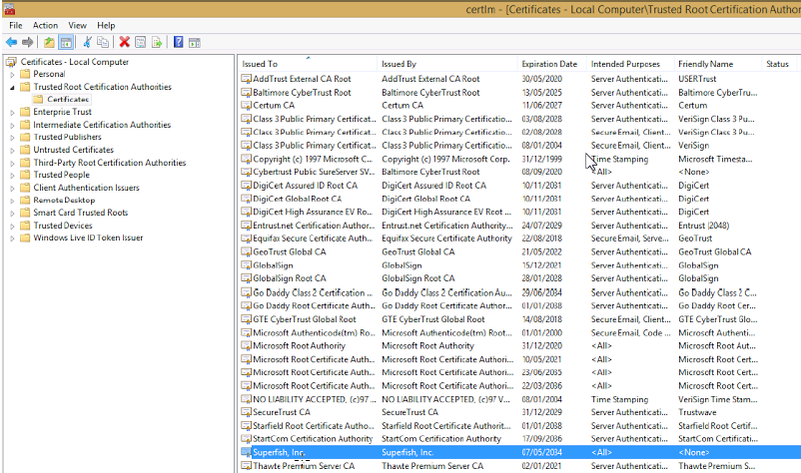
As mentioned above, the certificate used by Superfish is a deprecated SHA1 certificate that uses 1024-bit RSA. This is particularly obnoxious because they have installed into the system certificates as an unrestricted trusted root certificate. To put it into context, they gave it the same level of trust and authority as Microsoft’s own root certificate. Users affected by this can go to any site on the internet, and so long as it presents this certificate, they will be fooled into thinking they have a secure connection. Since this certificate uses SHA1 it is feasible that an attacker could break it and hijack it. This means an attacker could create a bogus certificate that every one of these users would trust.

uperfish-certs

This is unbelievably ignorant and reckless of them. Its quite possibly the single worst thing I have seen a manufacturer do to its customer base. At this point I would consider every single one of these affected laptops to be potentially compromised and would reinstall them from scratch.

Lenovo’s response? Typical of companies caught with their hand in the cookie jar, they try to play it down while at the same time saying they have disabled it until it can be “fixed”:

https://forums.lenovo.com/t5/Lenovo-P-Y-and-Z-series/Lenovo-Pre-instaling-adware-spam-Superfish-powerd-by/m-p/1863174#M79882

However, it’s hard to see how they could “fix” this software. It’s core functionality undermines the security of SSL rendering the last decade or so of work making the web secure completely irrelevant.

UPDATE: –

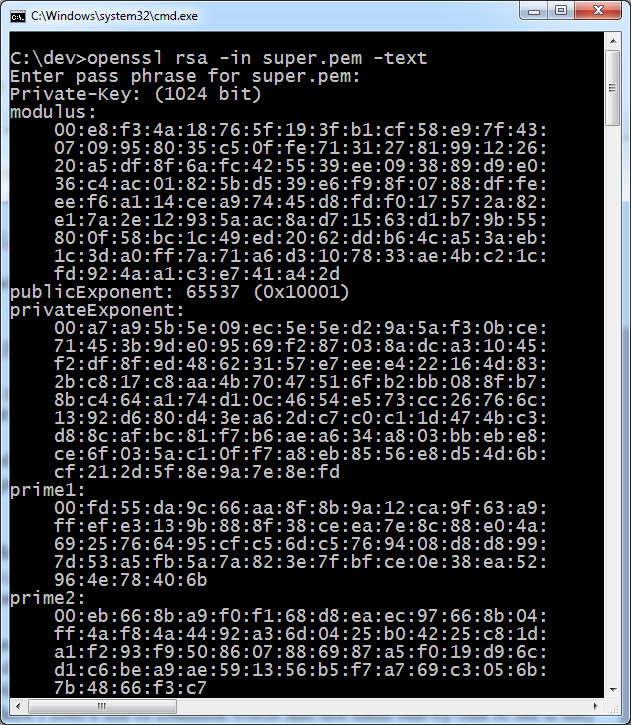
It’s not often that things like this actually get worse. This one has. So, because the man-in-the-middle happens locally, it’s clear that the private key has to be bundled with the software. This is because in order to sign sites on the fly, the software has to do that with the private key.

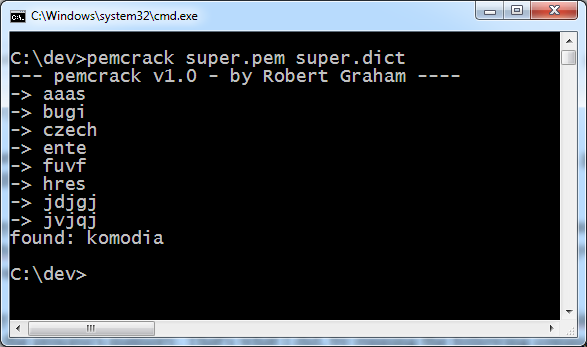
This is really bad practice. What makes it even worse is that they used a simple dictionary word as the password for the key. After a little reverse engineering, it is possible to extract that key and crack the password.  Armed with the private key and its password, you can now sign websites and even software in a way that any affected Lenovo user will trust. What’s worse is you can do it under any fake name that you like. Want to sign a virus so that it looks like legitimate Microsoft software? Go ahead: this will let you do exactly that. Want to set up a fake banking site and pretend to be HSBC? Yup, you can do that too.

Who needs to crack SHA1 or factor RSA-1024 if all you need to do is extract the private key? Game Over.

What was the password they used? Komodia. Both a ridiculously easy dictionary word and the name of a well known manufacturer of SSL products. What’s the betting that they are behind this, and that their own SSL proxy products are designed in a similarly terrifying way?

super-03 super-04

Read more about the reverse engineering of Superfish on Errata Rob’s Blog –

http://blog.erratasec.com/2015/02/extracting-superfish-certificate.html#.VOY1QCmJndk

HOW TO CHECK IF YOU ARE AFFECTED:

My colleague Filippio – @FiloSottile has written a detector for superfish affected laptops. To test if you are affected simply click on the URL below:

https://filippo.io/Badfish/

WHAT TO DO IF YOU ARE AFFECTED:

Lenovo has published instructions for removing the app:

https://forums.lenovo.com/t5/Lenovo-P-Y-and-Z-series/Removal-Instructions-for-VisualDiscovery-Superfish-application/ta-p/2029206

I have checked them and they are sound BUT they do not provide instructions for removing the malicious certificate in the system certificate store.

To remove the certificate (which is the worst part) follow these instructions:

  1. Go to Control Panel and search for ‘certificates’.
  2. You’ll find yourself in Administrative Tools.
  3. Select “Manage computer certificates” ,
  4. click on the folder labeled Trusted Root Certification Authorities
  5. Click on Certificates.
  6. Find the one labelled “Superfish Inc”, right-click and chose to delete it

HT to @semenko @kennwhite @fugueish on twitter for the screenshots!